
Showing posts with label Programming. Show all posts
Showing posts with label Programming. Show all posts
Wednesday, February 18, 2015
Today, we are going to learn about Thread in JAVA.
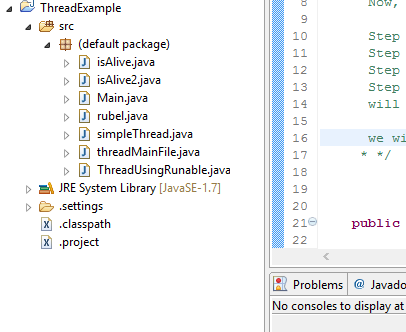
simpleThread.java Class
 public class simpleThread implements Runnable {
 /*
  What is Thread in JAVA Programming?
  Ans: Thread is a path of execution within a program. Multi Threading is multiple path
  of execution at the same time. Thread is a way, how your computer allows you to do
  multiple things at once. This is the simplest definition of thread.

   Now, how we will be working with Thread in practice?

   Step 1: Creating a thread object from thread class
   Step 2: Then we will start thread
   Step 3: Just to start, thread will look for RUN method.
   Step 4: While finds run method, the code into the RUN method
   will be executed.

   we will be implementing Runnable interface here.
  * */


 public static void main(String[] args) {

  System.out.println("Downloading two files..:");
  // we are creating a thread object below
  Thread t1 = new Thread() {
   /*
    After t1.start , execution comes here to look for run
    Then the codes in run should be executed.

    */
   public void run() {
    for (int k = 0; k <= 20; k++) {
     System.out.println("File 1 downloaded " + k * 5 + "%");

     try {
      // Let the thread sleep for 1200 mili seconds.
      sleep(1200);
     } catch (InterruptedException threadExep) {
      threadExep.printStackTrace();
     }
    }

   }

  };
  // now, this will call run method
  t1.start();

  Thread t2 = new Thread() {
   public void run() {
    for (int k = 0; k <= 20; k++) {
     System.out.println("File 2 Downloaded " + k * 5 + "%");

     try {
      sleep(1000);
     } catch (InterruptedException threadExep) {
      threadExep.printStackTrace();
     }
    }

   }

  };

  t2.start();


  /*
   Using Runnable Interface(run method must be overridden):

   Step 1: We will Create an object of the class. Which is obj1 here.
   Step 2: Create a thread object and pass the class object through it
   Step 3: Start the thread, do operation.

   */
  simpleThread obj1 = new simpleThread();
  Thread t3 = new Thread(obj1);
  t3.start();


  /*

    This can be written as:

   Thread t3 = new Thread(new simpleThread());
   t3.start();

   * */

 }

 @Override
 public void run() {
  for (int p = 0; p <= 10; p++) {
   System.out.println("This is my T3 thread!");

  }

 }


}

/*

  What we are doing here:
  Creating couple of thread T1, T2. Then both starts and prints a for loop
  while both sleeps for 1200 and 1000 mili seconds respectively.
 See the outputs!
 */
Output is:
Downloading two files..:
File 1 downloaded 0%
File 2 Downloaded 0%
This is my T3 thread!
This is my T3 thread!
This is my T3 thread!
This is my T3 thread!
This is my T3 thread!
This is my T3 thread!
This is my T3 thread!
This is my T3 thread!
This is my T3 thread!
This is my T3 thread!
This is my T3 thread!
File 2 Downloaded 5%
File 1 downloaded 5%
File 2 Downloaded 10%
File 1 downloaded 10%
File 2 Downloaded 15%
File 1 downloaded 15%
File 2 Downloaded 20%
File 1 downloaded 20%
File 2 Downloaded 25%
File 2 Downloaded 30%
File 1 downloaded 25%
File 2 Downloaded 35%
File 1 downloaded 30%
File 2 Downloaded 40%
File 1 downloaded 35%
File 2 Downloaded 45%
File 1 downloaded 40%
File 2 Downloaded 50%
File 1 downloaded 45%
File 2 Downloaded 55%
File 1 downloaded 50%
File 2 Downloaded 60%
File 2 Downloaded 65%
File 1 downloaded 55%
File 2 Downloaded 70%
File 1 downloaded 60%
File 2 Downloaded 75%
File 1 downloaded 65%
File 2 Downloaded 80%
File 1 downloaded 70%
File 2 Downloaded 85%
File 1 downloaded 75%
File 2 Downloaded 90%
File 2 Downloaded 95%
File 1 downloaded 80%
File 2 Downloaded 100%
File 1 downloaded 85%
File 1 downloaded 90%
File 1 downloaded 95%
File 1 downloaded 100%
Thursday, February 5, 2015
Hi to All!
Today we are going to learn another JAVA OOP concept which is Encapsulation. Let's Start:
Let's go through the files:
Read More: What are actually taught in computer science and Engineering ( CSE ) ?
Today we are going to learn another JAVA OOP concept which is Encapsulation. Let's Start:
 |
| Encapsulation in JAVA |
Let's go through the files:
1. myEncapsulation.java Class
/*
 What is Encapsulation?
 Ans: Encapsulation is something like hiding data.
 Encapsulation is a system by which we can keep things in a class secret( private )
 and access those through public methods from other class.

 If anything in a class declared private, that can't be accessed outside the
 class. More or less it's like reducing the dependency of our encapsulated class.
 Advantage of Encapsulation  is, if you need to change the codes, as because of
 less dependency you don't have to work much for modification.

 */

public class myEncapsulation {

 public static void main(String[] args) {

  // Now we will create object of our EncapsulationMethods class.
  EncapsulationMethods bankDetails = new EncapsulationMethods();

  /*
   I'm going to access the encapsulated class through creating object
   and the fields which are kept private in that class like
   bankBalance,accountNo.
   */
  bankDetails.AccountHolderByName("Mosharrof Rubel");
  bankDetails.FindAccountByName("Jakir Hossain");
  bankDetails.BalanceCheckByPin(1234);
 /*
 The printed output are:

 Name of the account holder is: Mosharrof Rubel
 Jakir Hossain is the account holder & Encapsulated account no is: 420
 Pin is: 1234 and Encapsulated balance is: 119273.78 BDT


  */

 }

}
2. EncapsulationMethods.java Class
public class EncapsulationMethods {

 // declaring some private variables
 private String person;
 private double bankBalance;
 private int accountNo;

 // declaring some public methods

 public void AccountHolderByName(String name){
  person = name;
  System.out.println("Name of the account holder is: "+person);
 }

 public void FindAccountByName(String name){
  accountNo = 420;
  System.out.println(name+" is the account holder & Encapsulated account no is: "+accountNo);
 }

 public void BalanceCheckByPin(int pin){
  bankBalance = 119273.78;
  System.out.println("Pin is: "+pin+ " and Encapsulated balance is: "+ bankBalance+" BDT");
 }


}
Read More: What are actually taught in computer science and Engineering ( CSE ) ?
Wednesday, February 4, 2015
Polymorphism
We are going to create four Java class in our Polymorphism class. Those are:
1. human.java class
2. women.java class
3. men.java class
4. main.java class
 |
| Polymorphism Classes |
The codes are given below.
1. human.java
package polymorphism;

/*

 What is polymorphism ?
 Answer: Coming out in different form when needed is called polymorphism.
 Polymorphism is a OOP ( Object Oriented Programming concept ). In more words,
 Java's polymorphism  means the ability of Java's ability utilize objects
 depending on their particular data type and class.

 This is my super class.

 */
public class human {

 public void goodPublic(){
  System.out.println(" In java human class "
    + "im printing good human method to understand polymorphism");
 }
}
2. women.java
package polymorphism;

// This is my subclass
public class women extends human{
 public void goodPublic(){
  System.out.println("This is a method printed output from WOmen class");

 }
}
3. men.java
package polymorphism;

// this is my subclass

public class men extends human {
 public void goodPublic(){
  System.out.println("This is a method printed output from men class");

 }
}
4. main.java
package polymorphism;

public class main {

 public static void main(String[] args) {

  /*
   Creating object of human class using inheritance OOP concept!
   We can create object as below using the inheritance as those sub class
   inherits human super class.

   In Below,
   meHuman,goodMen,goodWomen are reference variable.
   human is working as data type.
   */

  human meHuman = new human();
  human goodMen = new men();
  human goodWomen = new women();


  /*

    Now I'm going to create a Polymorphism array below of the super class
    and put the subclass objects there.


   */

  human[] polymorphicArray = new human[3];

  polymorphicArray[1] = new women();
  polymorphicArray[2] = new men();
  polymorphicArray[3] = new human();

  // Printing those methods from subclass

  polymorphicArray[1].goodPublic();
  polymorphicArray[2].goodPublic();


  /*

    Here, this array is a array of polymorphism. This array has the ability
    to utilize objects differently depending on data type or class.

   */

 }
/*
  In final words, if u call a animal Sound super class and cat, dog subclass.
  no matter what the animal is working with the animal sound
   will return you the real animal sound.
  so, animal sound method is working as cat sound once and dog sound once.
  That's the different form! That's called polymorphism.
 */
}
Overriding: In inherited subclass, if a method uses same name as the method
declared in super class but the different method body is called as overriding.Overloading: In inherited subclass, if a method uses same name as the method declared in super class but the different method body and different arguments is called as Overloading.
Read More: What are actually taught in computer science and Engineering ( CSE ) ?
Polymorphism
We are going to create four Java class in our Polymorphism class. Those are:
1. human.java class
2. women.java class
3. men.java class
4. main.java class
|
| Polymorphism Classes |
The codes are given below.
1. human.java
package polymorphism;

/*

 What is polymorphism ?
 Answer: Coming out in different form when needed is called polymorphism.
 Polymorphism is a OOP ( Object Oriented Programming concept ). In more words,
 Java's polymorphism  means the ability of Java's ability utilize objects
 depending on their particular data type and class.

 This is my super class.

 */
public class human {

 public void goodPublic(){
  System.out.println(" In java human class "
    + "im printing good human method to understand polymorphism");
 }
}
2. women.java
package polymorphism;

// This is my subclass
public class women extends human{
 public void goodPublic(){
  System.out.println("This is a method printed output from WOmen class");

 }
}
3. men.java
package polymorphism;

// this is my subclass

public class men extends human {
 public void goodPublic(){
  System.out.println("This is a method printed output from men class");

 }
}
4. main.java
package polymorphism;

public class main {

 public static void main(String[] args) {

  /*
   Creating object of human class using inheritance OOP concept!
   We can create object as below using the inheritance as those sub class
   inherits human super class.

   In Below,
   meHuman,goodMen,goodWomen are reference variable.
   human is working as data type.
   */

  human meHuman = new human();
  human goodMen = new men();
  human goodWomen = new women();


  /*

    Now I'm going to create a Polymorphism array below of the super class
    and put the subclass objects there.


   */

  human[] polymorphicArray = new human[3];

  polymorphicArray[1] = new women();
  polymorphicArray[2] = new men();
  polymorphicArray[3] = new human();

  // Printing those methods from subclass

  polymorphicArray[1].goodPublic();
  polymorphicArray[2].goodPublic();


  /*

    Here, this array is a array of polymorphism. This array has the ability
    to utilize objects differently depending on data type or class.

   */

 }
/*
  In final words, if u call a animal Sound super class and cat, dog subclass.
  no matter what the animal is working with the animal sound
   will return you the real animal sound.
  so, animal sound method is working as cat sound once and dog sound once.
  That's the different form! That's called polymorphism.
 */
}
Overriding: In inherited subclass, if a method uses same name as the method
declared in super class but the different method body is called as overriding.Overloading: In inherited subclass, if a method uses same name as the method declared in super class but the different method body and different arguments is called as Overloading.
Read More: What are actually taught in computer science and Engineering ( CSE ) ?
Sunday, February 1, 2015
Hi guys!
Today we are going to learn couple of java OOP ( Object Oriented Programming ) concepts.
Before starting, go through this article: JAVA Tutorial : Inheritance Example Codes
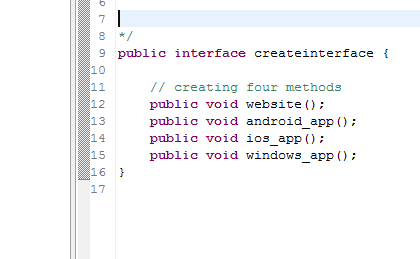
Today we are going to learn couple of java OOP ( Object Oriented Programming ) concepts.
Before starting, go through this article: JAVA Tutorial : Inheritance Example Codes
Abstract Class and Example in JAVA:
package interfacez;

/*

 This is a simple abstract class. An abstract class is a call of which no object
 can be created. Use 'abstract' keyword to make a class abstract.
 Methods can be abstract too. If in a class a method is abstract the class must have
 to be abstract.
 */
public abstract class myabstractclass {

	public static void main(String[] args) {
		// TODO Auto-generated method stub

	}

	/*
	 An abstract method must not have a body.
	 In an abstract class you can have a non abstract method.
	 */
	abstract public void specialAbstractMethod();

}
Java interface: Creating Java Interface
package interfacez;
/* This is my interface. I will inherit this from my main class.
  This is also the java super class for my main class from which i will
  call this file and access those methods.


*/
public interface createinterface {

	// creating four methods
	public void website();
	public void android_app();
	public void ios_app();
	public void windows_app();
}
Java interface: Calling methods from main class
package interfacez;

/*
 Interface is a type that brings behaviors which a class can implement according to its need.
 implements keyword is used to implement an interface in a java class.
 Interface is a class like thing which is 100% abstract. A class can implement
 any number of interfaces that it wants.If needed interface can be extended using
 inheritance concept of OOP( Object Oriented Programming. )


 */
public class myinterfaceclass implements createinterface{

	public static void main(String[] args) {
		/* creating object for my class, so that i can call the methods that have
		come from interface.
	*/
		myinterfaceclass Apps_Object = new myinterfaceclass();

		/*
		 Calling the methods using my object.

		 */
		Apps_Object.website();
		Apps_Object.ios_app();
		Apps_Object.android_app();
		Apps_Object.windows_app();

	}

	/*
	 Overriding the abstract methods that have come from interface.

	 */

	public void website(){
		System.out.println("Java tutorials on my website.");
	}
	public void android_app(){
		System.out.println("PHP tutorials on my android app.");
	}
	public void ios_app(){
		System.out.println("JavaScript tutorials on my iOS App.");
	}
	public void windows_app(){
		System.out.println("C Sharp ( C# ) on my windows app.");
	}


}
Hope this helps you! don't forget to share and subscribe!Read More: Differences Between Programmers and Coders
Wednesday, January 28, 2015
Today we are going to learn Inheritance in JAVA. I've created four java class file. Those are:
1. fatherswealth.java ( Superclass )
2. lawyer.java ( Main Class )
3. myself.java ( Subclass )
4. mybrother.java ( Subclass )

Here are the codes:
1. fatherwealth.java
4. lawyer.java
1. fatherswealth.java ( Superclass )
2. lawyer.java ( Main Class )
3. myself.java ( Subclass )
4. mybrother.java ( Subclass )
Here are the codes:
1. fatherwealth.java
/*Inheritance means inheriting stuffs ( variables, methods etc ) from other class.
Why inheritance is important?
Well, if we need same stuffs for many classes. We need to write code in every class
rather doing that we will write same thing in one class and access that from other
class through inheritances.
*/
package myinheritence;
//my java super class
public class fatherswealth {
public static void fatherswealth() {
// TODO Auto-generated method stub
System.out.println("My car, flat, lands all are for my two sons!");
}
}
2. myself.java
package myinheritence;//my Java Sub class
public class myself extends fatherswealth{
/* in java writing Extends after class name means, you are inheriting.
* Here we are going to inherit everything from the fathers Wealth class.
*/
public void fromFather(String[] args) {
//System.out.println("my father says, ");
}
}
3. mybrother.java
package myinheritence;
/* This is my my java subclass.
Note: we will inherit a class by using the keyword EXTENDS
*/
public class mybrother extends fatherswealth{
// in this mybrother class we are also inheriting the class fatherswealth
public void fromFather(String[] args) {
System.out.println("printing from mybrother dot java class, My father says, ");
// calling by the power of inheritance
fatherswealth fb= new fatherswealth();
fb.fatherswealth();
// we can use super keyword to call also from super class
super.fatherswealth();
System.out.println("Ends printing frtom my brother dot java class");
}}
4. lawyer.java
package myinheritence;
public class lawyer {
public static void main( String[] args ) {
/*
Now i will create the object from the myself class to access the class.
as the class is inherited, i can access the fatherwealth class through mybrother class
*/
myself meObj = new myself();
mybrother myBro = new mybrother();
/* object and method name separated by dot for printing the outcomes which are
inherited from the fatherwealth class
*/
// calling inheritance for my brother.
myBro.fromFather(args);
myBro.fatherswealth();
// calling inheritance from me
meObj.fromFather(args);
meObj.fatherswealth();
/*
if you use the java Static keyword in method, you can access it without creating object.
i used static keyword in fatherswealth class, so i can call it without object like below example.
*/
fatherswealth.fatherswealth();
}
}
/* Note 1: only public methods can be inherited.
Note 2: If you want to keep one method as same as inherited class, you can write that in your subclass by overriding.
Note 3: If you inherit a superclass and that superclass inherits another class. then you will access your immediate superclass
and also the superclass that your superclass accessed.
Note 4: A static and final method can not be overridden.
Note 5: Method overloading deals with the notion of
having two or more methods(functions) in the same class with the same name but different arguments.
*/
Saturday, January 24, 2015
Array: An array is something more or less like a container of data. Array container contains same type of data.

Read More from Oracle >> Here!
Java Code for practicing:
Output:
Read More from Oracle >> Here!
Java Code for practicing:
import java.util.Arrays;
public class myarray {
public static void main(String [] args) {
// declaring an array in java
int[] javaArray = new int[10];
// array with values
String prof[] = {"lawyear", "engineer", "stupoid", "developer"};
// allowed but not preferred declaring java array
int buy[];
buy = new int[10];
// java array of numbers, integer
int javaNumberArray[] = {2,3,6,7,78,8};
int[] [] learn = { {1,2,3}, {4,5,6}, {7,8,9,81}, {10,11, 12} };
// how to print a java array length
System.out.println( " My Java Array leangth: "+ learn.length );
int s;
for( s=0; s < javaNumberArray.length; s++ ) {
System.out.println( "My Array output, according to index is: "+ javaNumberArray[s] );
}
// printing a 2d array in java
int p,q;
for( p=0; p < learn.length; p++ ) {
for(q=0; q< learn[p].length; q++ ) {
System.out.println( learn[p][q] );
}
}
for(int n: javaNumberArray) {
System.out.println("My Arrar Java Number is: "+ n);
}
int[] seo = {1,2,23,3,3,3,4,4,5,6,67,7,8,89,9,76,4,33,3,32 } ;
// print a java array in one line
System.out.println( "Size of SEO ArrAy is: "+ Arrays.toString(seo)) ;
// print a java 2d ( 2 dimentional ) array in one line
System.out.println( "Size of 2D Learn ArrAy is: "+ Arrays.deepToString(learn)) ;
}
}
Output:
My Java Array length: 4
My Array output, according to index is: 2
My Array output, according to index is: 3
My Array output, according to index is: 6
My Array output, according to index is: 7
My Array output, according to index is: 78
My Array output, according to index is: 8
1
2
3
4
5
6
7
8
9
81
10
11
12
My Arrar Java Number is: 2
My Arrar Java Number is: 3
My Arrar Java Number is: 6
My Arrar Java Number is: 7
My Arrar Java Number is: 78
My Arrar Java Number is: 8
Size of SEO ArrAy is: [1, 2, 23, 3, 3, 3, 4, 4, 5, 6, 67, 7, 8, 89, 9, 76, 4, 33, 3, 32]
Size of 2D Learn ArrAy is: [[1, 2, 3], [4, 5, 6], [7, 8, 9, 81], [10, 11, 12]]
Wednesday, January 7, 2015
Hello Developers! Being a mobile application developer I must have concern on JAVA language. Just thinking to write a tutorial for you guys too. Work as you think! Let's go..
JAVA: A very high level object oriented programming language. Java was brought in 1995 ( came from a language named OAK )and created by Sun Microsystems. Java is one of the most used and famous programming languages around the world.

USES OF JAVA: Java can be used to develop desktop applications, mobile applications ( You will be able to developer Android application by Java ) and web applications.
CASE SENSIVITY: It's very important point to notice about, JAVA is a very much case sensitive language. You have to be careful while coding in JAVA.
JAVA SE: It stands for Java Standard Edition. It's widely used for developing portable software applications for web severs and desktop computer environment.
J2SE: Java 2 Standard Edition
JAVA EE: It stands for Java Enterprise Edition
JAVA ME: It stands for Java Micro Edition
JRE: Java Runtime Environment
JDK: Java Development Kit
JVM: Java Virtual Machine
Some of JAVA IDE( Integrated Development Environment ): Eclipse, NetBeans, drJAVA etc.
JAVA Package: It's a system or procedure for keeping Java classes into namespaces. Normally, in our program we call a package when needed. Example of a Java package: java.io , java.lang
NEEDED TOOLS: JRE / JDK , IDE
I'm planning to go far with these tutorials, let's see what happen. In next tutorial we'll start coding. But I'm going to show an example of Java code how it looks for you.
Example:
public class javaclasswithrubel {
public static void main(String[] args) {
System.out.println(" hi java developers, my name is rubel. You are visiting www.imrubel.blogspot.com , don't forget to stay connected. ");
}
}
|| The output of this program will be, “ hi java developers, my name is rubel. You are visiting www.imrubel.blogspot.com , don't forget to stay connected. ”
Read More: Differences Between Programmers and Coders
Share for others, Subscribe for you!
Saturday, November 8, 2014
Hello Android developers! This is one of the common problems in Android Application development. Just previous day, while I was developing 7 March Speech Application, I faced this problem for a awkward reason. Normally, this is not a big problem but this hurts. This could be happening for few reasons. I'll tell about the problems and solution as well as.
Basically, when you start and open a project java automatically generates a folder file called 'gen'. After your build there are a file generated called R.java , but if your have error in somewhere that couldn't be generated and problem appears.
 |
| R.JAVA file |
Read More: Google Play New Android SDK Setup for AdMob ( AdSense )
Point 1: First of all, this happens mostly if you have an error in your any of XML file. So, first check your XML files ( could be in layout folder, because you edit that most ) and solve the red pointed error. Solve the error the problem will be gone.
Point 2: Sometimes, after fixing error, this could show up again and again. Just go to Project > clean project and clear the project. You can restart your ADT ( Android development Tools )
Point 3: In my previous project, I named 'if' an image and kept it to my resources folder. The problem R cannot be resolved to a variable type appeared for that! As soon as i renamed the file, the problem went away. Clean and build again.
Point 4: Name your files careful, like your new XML file, new image. This error could be appearing for that too. Write your resource names in lower case, make sure those are not conflicting with anything. You won't find R cannot be resolved to a variable type anymore.
Read More: Career in Mobile Application Development for You : My Experience
Point 5: Make sure your are working with latest SDK ( Software Development Kit ). Go to menu and click on SDK manager. Check if any update are available. If available, make sure you updates those. That could be a reason for this error too.
Point 6: Make sure you ADT ( Android Development Tools ) are latest and updated. This could help the error to come up.
Point 7: Right click on your project. Go to Java Build Path. Then, in Order and Export tab look for your latest Android version ( Ex: Android 5.0 ), check that and click OK. Then from your
Point 8: After making changes don't forget to clean your project and then build.
Those are Eight points with eight various problems. You could create a new one and face this problem! Just kidding g :P If you find anything new on this type problem, don’t forget to leave a comment. Share this post for others. Others will help you too.
Happy Programming, Happy developing!
Read More: 9 Ideas for Career ( Online Money Making ) based on your Love
Wednesday, September 17, 2014
People related to programming and coding often make mistakes or misuse the words Coders and Programmers by not knowing properly. So, question is
Let me explain couple of situations first and then I will relate the Programmer and Coder according to their action in that situations.
Situation 1: A bus was going on a road and faced a tunnel in front. The tunnel is just couple of inches smaller than the bus. The bus stacked for just couple of inches. If the bus were couple of inches smaller it could have gone easily through the tunnel. Now, we called a programmer and a coder to solve this problem.
Coder: He decided to hire a crane and solve the problem. He took two hours and spent 1000 USD for a crane. The crane came and took the bus over the tunnel. Problem solved!
Programmer: A programmer came to the spot and observed the situation. He saw, if the bus could be made couple of inches little it could easily go through the tunnel. He came to the wheels of bus and left the air go into it. Because of releasing air from wheels, the bus came down and were able to go through the tunnel. He saved both time and money.
Situation 2: Teacher assigned a assignment for a programmer and a coder. Design a CMS ( Content Management System )
Coder: A coder will find out the pseudo code or blueprint of CMS anyhow and code according to that blueprint.
Programmer: A programmer won't look for blueprint or pseudo code. He'd love to design the logic and full work process of the CMS ( Content Management System ). After the sketch and designing he will start coding for this project.
Now, I guess you are clear about the differences between a programmer and a coder. A coder is who codes and doesn't need to think about anything else like logic, code efficiency etc.
But a programmer is someone who is not just a coder but along with coding he creates logic, design logic, thinks, think about the output, thinks about the code efficiency, think to make it better, think to make it working and so on.
A programmer is not in the same queue with a coder, he makes his specification with,
- better thinking
- managing the project
- not just code but doing also technical specification
- quality of work/project
- quality of code
and so on.
So, what would you like to be ? A programmer or a coder?
For your career option, Read : 9 Ideas for Career ( Online Money Making ) based on your Love
If you are loving my articles, don't forget to subscribe for more. I'd love to share my experiences in different Career Paths so that you don't have to face much problem by yourself( what I faced already ) but can go smoothly.
What are the differences between programmers and coders?
 |
| Code It's fun |
Let me explain couple of situations first and then I will relate the Programmer and Coder according to their action in that situations.
Situation 1: A bus was going on a road and faced a tunnel in front. The tunnel is just couple of inches smaller than the bus. The bus stacked for just couple of inches. If the bus were couple of inches smaller it could have gone easily through the tunnel. Now, we called a programmer and a coder to solve this problem.
Coder: He decided to hire a crane and solve the problem. He took two hours and spent 1000 USD for a crane. The crane came and took the bus over the tunnel. Problem solved!
 |
| Eat Sleep Code |
Programmer: A programmer came to the spot and observed the situation. He saw, if the bus could be made couple of inches little it could easily go through the tunnel. He came to the wheels of bus and left the air go into it. Because of releasing air from wheels, the bus came down and were able to go through the tunnel. He saved both time and money.
Situation 2: Teacher assigned a assignment for a programmer and a coder. Design a CMS ( Content Management System )
Coder: A coder will find out the pseudo code or blueprint of CMS anyhow and code according to that blueprint.
Programmer: A programmer won't look for blueprint or pseudo code. He'd love to design the logic and full work process of the CMS ( Content Management System ). After the sketch and designing he will start coding for this project.
 |
| Trust Me, I'm a programmer |
Now, I guess you are clear about the differences between a programmer and a coder. A coder is who codes and doesn't need to think about anything else like logic, code efficiency etc.
But a programmer is someone who is not just a coder but along with coding he creates logic, design logic, thinks, think about the output, thinks about the code efficiency, think to make it better, think to make it working and so on.
A programmer is not in the same queue with a coder, he makes his specification with,
- better thinking
- managing the project
- not just code but doing also technical specification
- quality of work/project
- quality of code
and so on.
So, what would you like to be ? A programmer or a coder?
For your career option, Read : 9 Ideas for Career ( Online Money Making ) based on your Love
If you are loving my articles, don't forget to subscribe for more. I'd love to share my experiences in different Career Paths so that you don't have to face much problem by yourself( what I faced already ) but can go smoothly.
Subscribe to:
Posts (Atom)
Me on FB

Popular Articles
-
 Hello mobile apps developers! if you are developing Mobile application in Phonegap platform. You might face a problem in sometime ' C...
-
Hello Google Play Android Developers! Recently, Google is forcing its developers to use Android Studio rather than using Android Developmen...
-
 Even if you are not from Computer Engineering background, still you can have Career in Mobile Application Development. Honestly speaking, b...
-
 Polymorphism We are going to create four Java class in our Polymorphism class. Those are: 1. human.java class 2. women.java class...
-
 Hello developers! Hope you are doing well. Many people are coming to application developing, specially in the Android arena. Now, What! Th...
-
 You could find this topic little bit interesting and may not be hoping from me! Well, I was at gym for almost one year and I think I'm ...
-
 Today, we are going to learn about Thread in JAVA. simpleThread.java Class public class simpleThread implements Runnable { /* ...

Popular Posts
-
Hello Google Play Android Developers! Recently, Google is forcing its developers to use Android Studio rather than using Android Developmen...
-
Even if you are not from Computer Engineering background, still you can have Career in Mobile Application Development. Honestly speaking, b...
-
You could find this topic little bit interesting and may not be hoping from me! Well, I was at gym for almost one year and I think I'm ...
-
 Array: An array is something more or less like a container of data. Array container contains same type of data. Read More from Orac...
-
Polymorphism We are going to create four Java class in our Polymorphism class. Those are: 1. human.java class 2. women.java class...
-
Today, we are going to learn about Thread in JAVA. simpleThread.java Class public class simpleThread implements Runnable { /* ...
-
Polymorphism We are going to create four Java class in our Polymorphism class. Those are: 1. human.java class 2. women.java class...
-
 Hi to All! Today we are going to learn another JAVA OOP concept which is Encapsulation. Let's Start: Encapsulation in JAVA Let...
-
Hello mobile apps developers! if you are developing Mobile application in Phonegap platform. You might face a problem in sometime ' C...
-
Hello developers! Hope you are doing well. Many people are coming to application developing, specially in the Android arena. Now, What! Th...

 Posts

