
Showing posts with label how to monetize mobile application. Show all posts
Showing posts with label how to monetize mobile application. Show all posts
Wednesday, October 22, 2014
Hello Mobile Application developers! Ya, Google has moved to a change and we developers will have to cope up with that change. To set up Admob in new updated SDK , we need to do some tasks. Few of them are tricky, so be with me and follow my instruction. I faced some problems and that ruined my few days to fix it. If you follow this , I hope you won't have to face the same way.
Previously, we used to use GoogleAdMobAdsSdk-6.4.1.jar in our application for monetization. But now we have to go up. Now, we don't need any .jar file but update our SDK. I would suggest to download a new one.

So, Let's start:
Task 1: Download the fresh and new Android SDK from Here. Make sure, you are using a computer with 64 bit, otherwise it won't show up the Android Virtual Device ( AVD ).
Now you need to make some updates.
Task 2: Open up eclipse from the Android SDK and go to Window > Android SDK Manager. Or, click on the icon shown in below image.
A new window will show up SDK. Here we will make some updates. Look at the below images, and check
those ( Which are installed in below images ) on your Android SDK Manager and click on Install x packages after
accepting license agreement.
After installation, restart Eclipse. Now, we are done with installation.
Task 3: Now, go to your ADT bundle package on your PC and we need to copy a folder from there. Go to, ADT Bundle > SDK > Extras > Google > google_pay_services_libproject . Look at the file path at the below image. Copy the folder name google-play-services_lib.
Task 4: Done with copying? Now , we need to paste this folder on the project you are doing or the Application you are developing. Go to Eclipse and in project explorer paste this folder in to your project > libs. Now clear? Follow the below image.
Done with pasting? I guess thats easy! :3
Task 5: Now, we need to import that file. Look on the top left corner on your eclipse, click on File > Import > Android > Existing Android Code into Workspace . You need to import your full libs folder. Through this window, go to Workspace > Your Project > Libs . Select that and the click OK. Not clear yet? See, below screen shots.

Task 6: This very simple. Just check the imported file and click on finish. we are almost done! Below image will help you more,
Now, if the Imported file show an error and ask for number of SDK in L ( Android Lollipop ) preview, go there and make it L in the place of 8. Like below image:-
Task 7: Now, go to your AndroidManifest.xml file, We need to add some permission for showing admob Ads. Add bellow codes after <application />
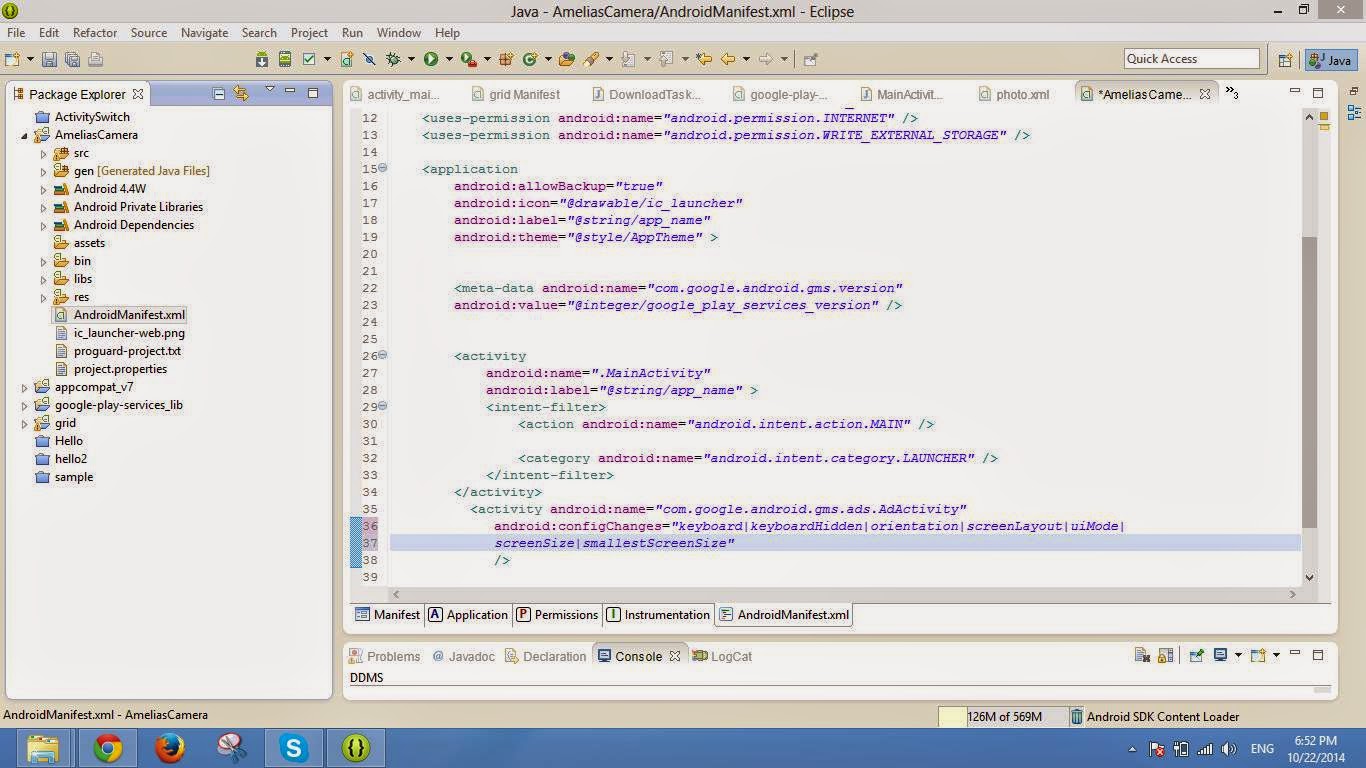
Task 8: Now, we will place the add codes in our main xml file. Open up , res/layout/activity_main.xml. See below image. Place <com.google.android.gms.ads.AdView> xml tag as show below and replace, adUnitId with your adUnitId , generated from admob.com
Task 9: You XML might be showing some errors till now. Add xmlns:ads = "http..." line on the <ScrllView> or <RelativeLayout> tag. The errors will be gone!
Task 10: Go to the MainActivity.java file. And couple of imports at the top :
Now, add couple more lines into onCreate method:
Well, I guess we are done! :D
There the ads should be shown up! Like the below image: -
Task 11: If yet not shown, you can go right click on Your Project > Android and select things like below image:

I hope no more error left! If you find more errors, go die! Just kidding, you can leave a comment below, I'll try to solve!
If the post helps you, comment, share for others, subscribe for you and buy me a MacBook Air :P
Previously, we used to use GoogleAdMobAdsSdk-6.4.1.jar in our application for monetization. But now we have to go up. Now, we don't need any .jar file but update our SDK. I would suggest to download a new one.
So, Let's start:
Task 1: Download the fresh and new Android SDK from Here. Make sure, you are using a computer with 64 bit, otherwise it won't show up the Android Virtual Device ( AVD ).
Now you need to make some updates.
Task 2: Open up eclipse from the Android SDK and go to Window > Android SDK Manager. Or, click on the icon shown in below image.
 |
| Android SDK Manager |
 |
| You need to install those Installed Packages |
 |
| You need to install those Installed Packages |
After installation, restart Eclipse. Now, we are done with installation.
Task 3: Now, go to your ADT bundle package on your PC and we need to copy a folder from there. Go to, ADT Bundle > SDK > Extras > Google > google_pay_services_libproject . Look at the file path at the below image. Copy the folder name google-play-services_lib.
 |
| See the file path and Copy this folder |
Task 4: Done with copying? Now , we need to paste this folder on the project you are doing or the Application you are developing. Go to Eclipse and in project explorer paste this folder in to your project > libs. Now clear? Follow the below image.
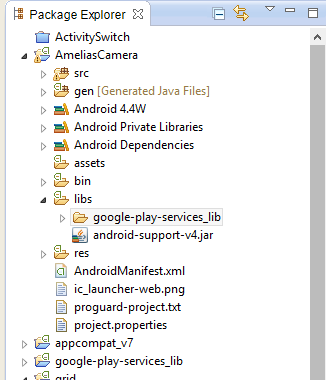 |
| Paste the folder into libs |
Done with pasting? I guess thats easy! :3
Task 5: Now, we need to import that file. Look on the top left corner on your eclipse, click on File > Import > Android > Existing Android Code into Workspace . You need to import your full libs folder. Through this window, go to Workspace > Your Project > Libs . Select that and the click OK. Not clear yet? See, below screen shots.
 |
| After clicking on libs, click OK |
Task 6: This very simple. Just check the imported file and click on finish. we are almost done! Below image will help you more,
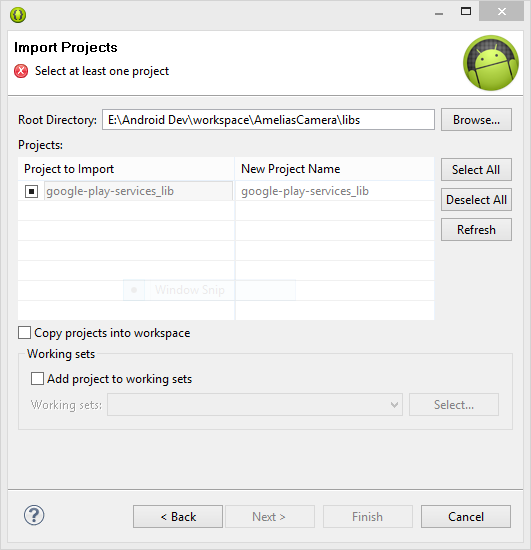 |
| See the Root Directory Path |
Now, if the Imported file show an error and ask for number of SDK in L ( Android Lollipop ) preview, go there and make it L in the place of 8. Like below image:-
 |
| Buddy, Make it L , replace 8 |
Task 7: Now, go to your AndroidManifest.xml file, We need to add some permission for showing admob Ads. Add bellow codes after <application />
Then, add another activity code, just after the first activity. Not clear? just copy below codes as the image suggests place:
<meta-data android:name="com.google.android.gms.version"
        android:value="@integer/google_play_services_version" />
<activity android:name="com.google.android.gms.ads.AdActivity"
android:configChanges="keyboard|keyboardHidden|orientation|screenLayout|uiMode|
screenSize|smallestScreenSize"
/>
Task 8: Now, we will place the add codes in our main xml file. Open up , res/layout/activity_main.xml. See below image. Place <com.google.android.gms.ads.AdView> xml tag as show below and replace, adUnitId with your adUnitId , generated from admob.com
 |
| go to admob.com and generate an add, get adUnitId |
Task 9: You XML might be showing some errors till now. Add xmlns:ads = "http..." line on the <ScrllView> or <RelativeLayout> tag. The errors will be gone!
 |
| Add xmlns:adds line |
Task 10: Go to the MainActivity.java file. And couple of imports at the top :
import com.google.android.gms.ads.AdRequest;
import com.google.android.gms.ads.AdView;
Now, add couple more lines into onCreate method:
AdView adView = (AdView)this.findViewById(R.id.adView);
AdRequest adRequest = new AdRequest.Builder().build();
adView.loadAd(adRequest);
Well, I guess we are done! :D
There the ads should be shown up! Like the below image: -
 |
| Ads are appearing! |
Task 11: If yet not shown, you can go right click on Your Project > Android and select things like below image:
I hope no more error left! If you find more errors, go die! Just kidding, you can leave a comment below, I'll try to solve!
If the post helps you, comment, share for others, subscribe for you and buy me a MacBook Air :P
Read More: Career in Mobile Application Development for You : My Experience
Wednesday, September 10, 2014
Even if you are not from Computer Engineering background, still you can have Career in Mobile Application Development. Honestly speaking, being a Software Engineering student, I learned less in class room and more in practical life. So, if you are not from Computer Science background then what are you waiting for?
 |
| Mobile Apps Development |
What is Mobile Application Development?
This is the era of technology and we use Smart Phones. Like a computer need softwares like VLC, KMPlayer, Mozilla Firefox, Google Chrome etc. A smart phone can have applications like Temple Run, Subway Surfers, Kingsoft Office, Music Player, Google Chrome for Mobile etc. If you want to be a mobile application developer you have to develop application like these.
Future of Mobile Application Development
Along with web application development I develop Mobile Application too for Carnivalbd Apps Store. So, I have the opportunity to go through the mobile application development market. In one word the future of mobile application development market is “ Bright ” ! If you develop a medium quality static and content based mobile application and upload it in Application market like Google Play, iTunes and for Windows Phone, you will get minimum 20,000 and maximum 100,000 downloads in few months! And the good news is, you can monetize an application! So, that will bring money for you easily! Image a website with 10,000 visitors per day! Isn't that cool? Now, you have a platform of 100,000 people! Isn't that coolest? That's why I call it as Bright!
According to Emarketer.com , there are 1.75 Billion Smart Phone users in 2014 around the world! Now, by developing applications and reaching those amount of people will be far easy! Isn't it?
According to Emarketer.com , there are 1.75 Billion Smart Phone users in 2014 around the world! Now, by developing applications and reaching those amount of people will be far easy! Isn't it?
How to start Mobile Application Developing?
 |
| Google Play Card |
Mobile Application Development beginner should know few things before
taking first step for developing an application. Those are like basic
programming, knowledge in Java Programming, knowledge in design and of
course unique ideas for Application.
For example, developing an Android application for Google Play, you need to download ADT from Android.com site. Then start finding ideas and implementing those with code in ADT and build the APK file to upload in Google Play.
For example, developing an Android application for Google Play, you need to download ADT from Android.com site. Then start finding ideas and implementing those with code in ADT and build the APK file to upload in Google Play.
What is going to be your Million Dollar App ?
 |
| Angry Birds Logo |
Did you hear about the application named Angry Birds? Which is got a download range of 100,000,000 - 500,000,000 in Google Play Store and many more in Apple iTunes! And we call that type App as million dollar App! If you follow the image in below ( How Angry Birds Started ) , you will come to know how hard it is to make a Million dollar mobile application but definitely not impossible. Your one great idea can change your life! Not just Angry Birds, there are thousands applications which can be called as not just million but billion dollar application. I would like to mention the name of the application WhatsApp. Facebook bought WhatsApp for 19.2 Billion dollar! So, why don't you develop a application like WhatsApp and become not just millionaire but billionaire!
 |
| How Angry Birds Started |
How to learn Mobile Application Developing?
You can easily learn from Online resources like Articles, Videos and so on. There are a lot of videos in Youtube.com for free to learn about mobile application development. You can learn from any expert to be expert and learn faster.
How to monetize Application?
You can monetize application with Google Adsense in most famous platforms like Google Play, iTunes, Windows Phone. Not just Google Adsense but there are hundreds more Advertising platform for mobile. You just need some searching in Google.com . You can collect manual advertisements too. Besides, you can work for different company application too.
Subscribe to:
Posts (Atom)
Me on FB

Popular Articles
-
 Hello mobile apps developers! if you are developing Mobile application in Phonegap platform. You might face a problem in sometime ' C...
 -
Hello Google Play Android Developers! Recently, Google is forcing its developers to use Android Studio rather than using Android Developmen...
-
 Polymorphism We are going to create four Java class in our Polymorphism class. Those are: 1. human.java class 2. women.java class...
 -
 Even if you are not from Computer Engineering background, still you can have Career in Mobile Application Development. Honestly speaking, b...
 -
 Hello developers! Hope you are doing well. Many people are coming to application developing, specially in the Android arena. Now, What! Th...
 -
 You could find this topic little bit interesting and may not be hoping from me! Well, I was at gym for almost one year and I think I'm ...
 -
 Today, we are going to learn about Thread in JAVA. simpleThread.java Class public class simpleThread implements Runnable { /* ...

Popular Posts
-
Hello Google Play Android Developers! Recently, Google is forcing its developers to use Android Studio rather than using Android Developmen...
-
You could find this topic little bit interesting and may not be hoping from me! Well, I was at gym for almost one year and I think I'm ...
-
Even if you are not from Computer Engineering background, still you can have Career in Mobile Application Development. Honestly speaking, b...
-
Polymorphism We are going to create four Java class in our Polymorphism class. Those are: 1. human.java class 2. women.java class...
-
Today, we are going to learn about Thread in JAVA. simpleThread.java Class public class simpleThread implements Runnable { /* ...
-
 Array: An array is something more or less like a container of data. Array container contains same type of data. Read More from Orac...
 -
Hello mobile apps developers! if you are developing Mobile application in Phonegap platform. You might face a problem in sometime ' C...
-
Polymorphism We are going to create four Java class in our Polymorphism class. Those are: 1. human.java class 2. women.java class...
-
 Hi to All! Today we are going to learn another JAVA OOP concept which is Encapsulation. Let's Start: Encapsulation in JAVA Let...
 -
 Today we are going to learn Inheritance in JAVA. I've created four java class file. Those are: 1. fatherswealth.java ( Superclass ) ...

 Posts
Posts

