
Showing posts with label career opportunities. Show all posts
Showing posts with label career opportunities. Show all posts
Wednesday, October 22, 2014
Hello Mobile Application developers! Ya, Google has moved to a change and we developers will have to cope up with that change. To set up Admob in new updated SDK , we need to do some tasks. Few of them are tricky, so be with me and follow my instruction. I faced some problems and that ruined my few days to fix it. If you follow this , I hope you won't have to face the same way.
Previously, we used to use GoogleAdMobAdsSdk-6.4.1.jar in our application for monetization. But now we have to go up. Now, we don't need any .jar file but update our SDK. I would suggest to download a new one.

So, Let's start:
Task 1: Download the fresh and new Android SDK from Here. Make sure, you are using a computer with 64 bit, otherwise it won't show up the Android Virtual Device ( AVD ).
Now you need to make some updates.
Task 2: Open up eclipse from the Android SDK and go to Window > Android SDK Manager. Or, click on the icon shown in below image.
A new window will show up SDK. Here we will make some updates. Look at the below images, and check
those ( Which are installed in below images ) on your Android SDK Manager and click on Install x packages after
accepting license agreement.
After installation, restart Eclipse. Now, we are done with installation.
Task 3: Now, go to your ADT bundle package on your PC and we need to copy a folder from there. Go to, ADT Bundle > SDK > Extras > Google > google_pay_services_libproject . Look at the file path at the below image. Copy the folder name google-play-services_lib.
Task 4: Done with copying? Now , we need to paste this folder on the project you are doing or the Application you are developing. Go to Eclipse and in project explorer paste this folder in to your project > libs. Now clear? Follow the below image.
Done with pasting? I guess thats easy! :3
Task 5: Now, we need to import that file. Look on the top left corner on your eclipse, click on File > Import > Android > Existing Android Code into Workspace . You need to import your full libs folder. Through this window, go to Workspace > Your Project > Libs . Select that and the click OK. Not clear yet? See, below screen shots.

Task 6: This very simple. Just check the imported file and click on finish. we are almost done! Below image will help you more,
Now, if the Imported file show an error and ask for number of SDK in L ( Android Lollipop ) preview, go there and make it L in the place of 8. Like below image:-
Task 7: Now, go to your AndroidManifest.xml file, We need to add some permission for showing admob Ads. Add bellow codes after <application />
Task 8: Now, we will place the add codes in our main xml file. Open up , res/layout/activity_main.xml. See below image. Place <com.google.android.gms.ads.AdView> xml tag as show below and replace, adUnitId with your adUnitId , generated from admob.com
Task 9: You XML might be showing some errors till now. Add xmlns:ads = "http..." line on the <ScrllView> or <RelativeLayout> tag. The errors will be gone!
Task 10: Go to the MainActivity.java file. And couple of imports at the top :
Now, add couple more lines into onCreate method:
Well, I guess we are done! :D
There the ads should be shown up! Like the below image: -
Task 11: If yet not shown, you can go right click on Your Project > Android and select things like below image:

I hope no more error left! If you find more errors, go die! Just kidding, you can leave a comment below, I'll try to solve!
If the post helps you, comment, share for others, subscribe for you and buy me a MacBook Air :P
Previously, we used to use GoogleAdMobAdsSdk-6.4.1.jar in our application for monetization. But now we have to go up. Now, we don't need any .jar file but update our SDK. I would suggest to download a new one.
So, Let's start:
Task 1: Download the fresh and new Android SDK from Here. Make sure, you are using a computer with 64 bit, otherwise it won't show up the Android Virtual Device ( AVD ).
Now you need to make some updates.
Task 2: Open up eclipse from the Android SDK and go to Window > Android SDK Manager. Or, click on the icon shown in below image.
 |
| Android SDK Manager |
 |
| You need to install those Installed Packages |
 |
| You need to install those Installed Packages |
After installation, restart Eclipse. Now, we are done with installation.
Task 3: Now, go to your ADT bundle package on your PC and we need to copy a folder from there. Go to, ADT Bundle > SDK > Extras > Google > google_pay_services_libproject . Look at the file path at the below image. Copy the folder name google-play-services_lib.
 |
| See the file path and Copy this folder |
Task 4: Done with copying? Now , we need to paste this folder on the project you are doing or the Application you are developing. Go to Eclipse and in project explorer paste this folder in to your project > libs. Now clear? Follow the below image.
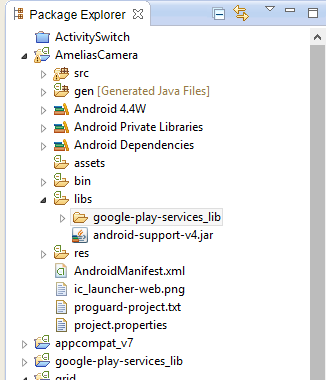 |
| Paste the folder into libs |
Done with pasting? I guess thats easy! :3
Task 5: Now, we need to import that file. Look on the top left corner on your eclipse, click on File > Import > Android > Existing Android Code into Workspace . You need to import your full libs folder. Through this window, go to Workspace > Your Project > Libs . Select that and the click OK. Not clear yet? See, below screen shots.
 |
| After clicking on libs, click OK |
Task 6: This very simple. Just check the imported file and click on finish. we are almost done! Below image will help you more,
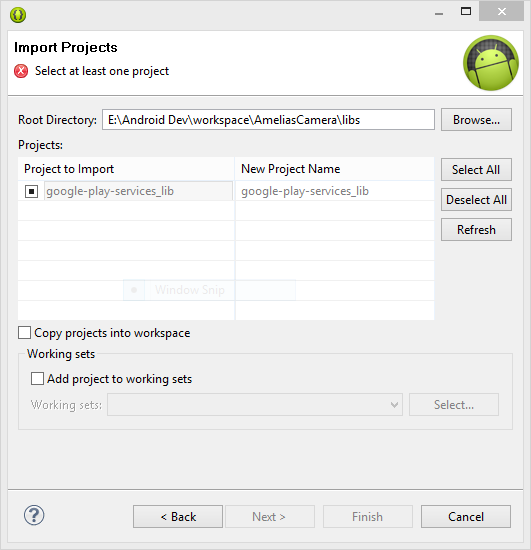 |
| See the Root Directory Path |
Now, if the Imported file show an error and ask for number of SDK in L ( Android Lollipop ) preview, go there and make it L in the place of 8. Like below image:-
 |
| Buddy, Make it L , replace 8 |
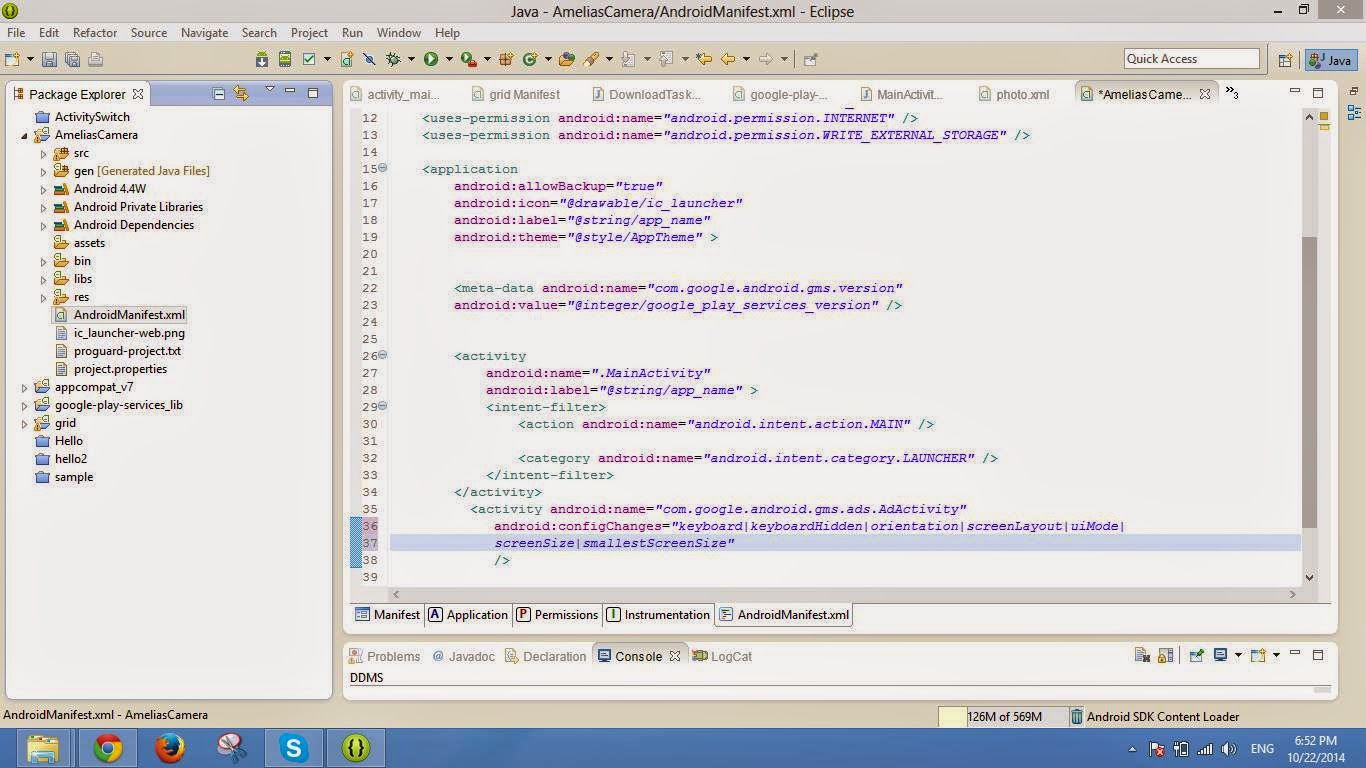
Task 7: Now, go to your AndroidManifest.xml file, We need to add some permission for showing admob Ads. Add bellow codes after <application />
Then, add another activity code, just after the first activity. Not clear? just copy below codes as the image suggests place:
<meta-data android:name="com.google.android.gms.version"
        android:value="@integer/google_play_services_version" />
<activity android:name="com.google.android.gms.ads.AdActivity"
android:configChanges="keyboard|keyboardHidden|orientation|screenLayout|uiMode|
screenSize|smallestScreenSize"
/>
Task 8: Now, we will place the add codes in our main xml file. Open up , res/layout/activity_main.xml. See below image. Place <com.google.android.gms.ads.AdView> xml tag as show below and replace, adUnitId with your adUnitId , generated from admob.com
 |
| go to admob.com and generate an add, get adUnitId |
Task 9: You XML might be showing some errors till now. Add xmlns:ads = "http..." line on the <ScrllView> or <RelativeLayout> tag. The errors will be gone!
 |
| Add xmlns:adds line |
Task 10: Go to the MainActivity.java file. And couple of imports at the top :
import com.google.android.gms.ads.AdRequest;
import com.google.android.gms.ads.AdView;
Now, add couple more lines into onCreate method:
AdView adView = (AdView)this.findViewById(R.id.adView);
AdRequest adRequest = new AdRequest.Builder().build();
adView.loadAd(adRequest);
Well, I guess we are done! :D
There the ads should be shown up! Like the below image: -
 |
| Ads are appearing! |
Task 11: If yet not shown, you can go right click on Your Project > Android and select things like below image:
I hope no more error left! If you find more errors, go die! Just kidding, you can leave a comment below, I'll try to solve!
If the post helps you, comment, share for others, subscribe for you and buy me a MacBook Air :P
Read More: Career in Mobile Application Development for You : My Experience
Friday, September 5, 2014
First of all, let make the 'freelancer' concept clear! There is a website for people who works as freelance called Freelancer.com ( same kind as oDesk, Elance and so on ) so, few people think working at on line may be Freelancing! But, freelancing could be at off line too! A freelancer is someone who doesn't work on a fixed place or job, he lances freely and does what he loves! That's why he's called a freelancer.
 |
| Freelancer Image |
Well, there a
thousands ways of making money rather I say building your career at
on line! For that you need few things like:-
1. Hard work
There is no short cut of success. You have to work hard at any corner of the planet for food and living!2. Patience
Some people need years to hunt and find a suitable job at on line , some need few hours! So, you have to be extremely patient on this sector!3. Discovering Yourself
This is the most important part, you have to know what you know! You have to find out your weakness and strength. Run on your strength, walk on your weakness and make the journey possible. Work harder on your weakness, make yourself unique. )
4. Target
Personally, I hate long term targets. It doesn't works that much. But, definitely you need target otherwise you don't know where are you going? During studying Computer Science, I learned Divide & Conquer algorithm in algorithm course. It's like diving a big problem into little pieces and winning each pieces. At the end of the day, you will win the complete war rather I say Target
Now, What are the career opportunities?
Honestly answering,
it could be anything depending on you! You have to find out your
strength and work on it, you will definitely find something for you!
Let me give some
example depending on you love of doing things! Ok?
 |
| Career Opportunities - Job Search |
1. Do you love Writing?
Career: You could
write in Freelnacer.com , Elance.com , oDesk.com writing section and make a good
profile for good career. You could open a blog for yourself, write
there and monetize with advertisement. You could monetize with
Google Adsense, Chitika.com, Clicksor.com, Bidvertise.com . If you heard the name
of famous blog Mashable.com you may know the CEO of Mashable.com
Pete Cashmore. He made his career in blogging. You could have
hard the name of John chow for johnchow.com and so on. You can also
write in some sites, they will share revenue with you! There is another
way of monetizing , you can do affiliation ( by, Amazon, Clickbank..
. . etc )
2. Do you love presenting? Tuition? Saying something?
Career: Just do a
little bit more, capture the video of what you love to do or
presenting! Upload in Youtube.com and other video sharing sites and
monetize easily! You should have a look at Videohive.net. You can sell
your videos in DVD or in on line creating your own platform.
Read Next Part: 9 Ideas for Career ( Online Money Making ) based on your Love
Subscribe to:
Posts (Atom)
Me on FB

Popular Articles
-
 Hello mobile apps developers! if you are developing Mobile application in Phonegap platform. You might face a problem in sometime ' C...
-
Hello Google Play Android Developers! Recently, Google is forcing its developers to use Android Studio rather than using Android Developmen...
-
 Even if you are not from Computer Engineering background, still you can have Career in Mobile Application Development. Honestly speaking, b...
-
 Polymorphism We are going to create four Java class in our Polymorphism class. Those are: 1. human.java class 2. women.java class...
-
 Hello developers! Hope you are doing well. Many people are coming to application developing, specially in the Android arena. Now, What! Th...
-
 You could find this topic little bit interesting and may not be hoping from me! Well, I was at gym for almost one year and I think I'm ...
-
 Today, we are going to learn about Thread in JAVA. simpleThread.java Class public class simpleThread implements Runnable { /* ...

Popular Posts
-
Hello Google Play Android Developers! Recently, Google is forcing its developers to use Android Studio rather than using Android Developmen...
-
Even if you are not from Computer Engineering background, still you can have Career in Mobile Application Development. Honestly speaking, b...
-
You could find this topic little bit interesting and may not be hoping from me! Well, I was at gym for almost one year and I think I'm ...
-
 Array: An array is something more or less like a container of data. Array container contains same type of data. Read More from Orac...
-
Polymorphism We are going to create four Java class in our Polymorphism class. Those are: 1. human.java class 2. women.java class...
-
Today, we are going to learn about Thread in JAVA. simpleThread.java Class public class simpleThread implements Runnable { /* ...
-
Polymorphism We are going to create four Java class in our Polymorphism class. Those are: 1. human.java class 2. women.java class...
-
 Hi to All! Today we are going to learn another JAVA OOP concept which is Encapsulation. Let's Start: Encapsulation in JAVA Let...
-
Hello mobile apps developers! if you are developing Mobile application in Phonegap platform. You might face a problem in sometime ' C...
-
Hello developers! Hope you are doing well. Many people are coming to application developing, specially in the Android arena. Now, What! Th...

 Posts

